> ## Documentation Index
> Fetch the complete documentation index at: https://docs.pxxl.app/llms.txt
> Use this file to discover all available pages before exploring further.
# Project Workspace
> Understand the project workspace and the tools available after a project is deployed.
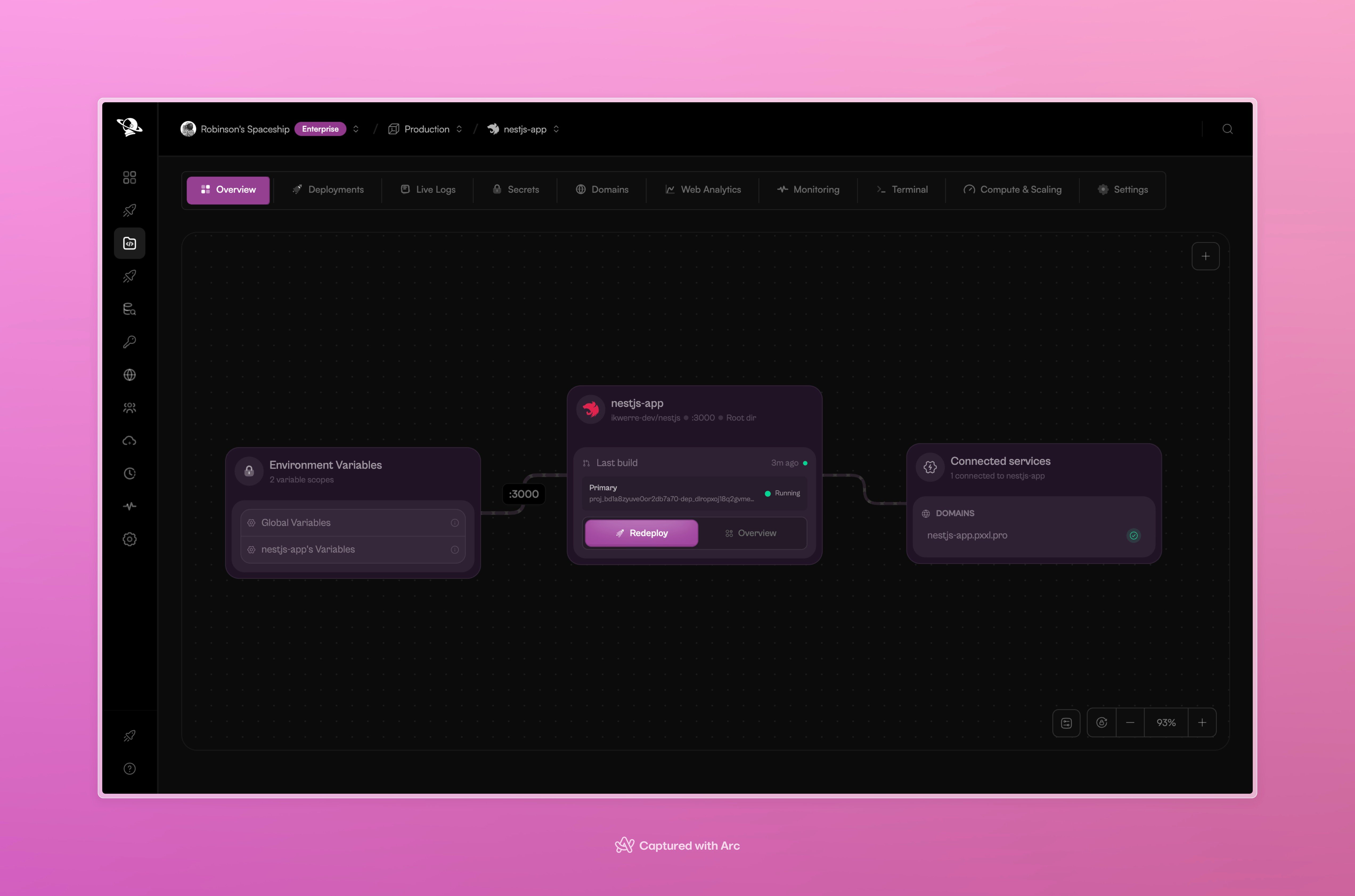
The project workspace brings a running application, its deployments, and its supporting tools into one place.
 ## What you can manage
| Area | What it shows |
| - | - |
| **Overview** | A visual map of the project, its current deployment, environment variables, and connected domains. |
| **Deployments** | Build history, commit details, status, and redeploy actions. |
| **Live Logs** | Runtime output from the active service. |
| **Secrets** | Environment variables used during build and runtime. |
| **Web Analytics** | Visitors, requests, bandwidth, latency, routes, and edge activity. |
| **Monitoring** | CPU, memory, sandbox overhead, and runtime footprint. |
| **Terminal** | A shell session inside the active runtime. |
| **Compute & Scaling** | CPU, memory, replicas, persistent volumes, and autoscaling. |
| **Password Protection** | A shared visitor password for preview-only or full-project access. See [Password Protection](/projects/password-protection). |
| **Log Drains** | Export project logs to an external destination such as S3-compatible storage. See [Log Drains](/storage/log-drains). |
Open a tab when you need to inspect one part of the project. The project remains connected to its source and deployment history while you work.
## A useful order
After a deployment:
1. Check **Overview** to confirm the service and domain.
2. Open **Deployments** to confirm the commit and build status.
3. Use **Live Logs** if the service does not start as expected.
4. Use **Monitoring** and **Web Analytics** to understand runtime and visitor activity.
5. Use **Secrets**, **Terminal**, or **Compute & Scaling** when the project needs a configuration change.
This documentation is built and hosted on [Mintlify](https://mintlify.com), a developer documentation platform.
## What you can manage
| Area | What it shows |
| - | - |
| **Overview** | A visual map of the project, its current deployment, environment variables, and connected domains. |
| **Deployments** | Build history, commit details, status, and redeploy actions. |
| **Live Logs** | Runtime output from the active service. |
| **Secrets** | Environment variables used during build and runtime. |
| **Web Analytics** | Visitors, requests, bandwidth, latency, routes, and edge activity. |
| **Monitoring** | CPU, memory, sandbox overhead, and runtime footprint. |
| **Terminal** | A shell session inside the active runtime. |
| **Compute & Scaling** | CPU, memory, replicas, persistent volumes, and autoscaling. |
| **Password Protection** | A shared visitor password for preview-only or full-project access. See [Password Protection](/projects/password-protection). |
| **Log Drains** | Export project logs to an external destination such as S3-compatible storage. See [Log Drains](/storage/log-drains). |
Open a tab when you need to inspect one part of the project. The project remains connected to its source and deployment history while you work.
## A useful order
After a deployment:
1. Check **Overview** to confirm the service and domain.
2. Open **Deployments** to confirm the commit and build status.
3. Use **Live Logs** if the service does not start as expected.
4. Use **Monitoring** and **Web Analytics** to understand runtime and visitor activity.
5. Use **Secrets**, **Terminal**, or **Compute & Scaling** when the project needs a configuration change.
This documentation is built and hosted on [Mintlify](https://mintlify.com), a developer documentation platform.